
Transparent stickers with Seedream 5.5
Define one recognizable character before building a set. Keep its silhouette, face, outfit and palette consistent across the poses.
Continue in the workspaceProduction preview
Checking model availability…Start with an idea
Choose a transformation. Its prompt and sample reference are ready to try.
Click to load the prompt and sample reference. You can replace the image with your own.
How to use it
- Define one recognizable character before building a set. Keep its silhouette, face, outfit and palette consistent across the poses.
- Ask for a visible die-cut outline and enough space between stickers. If you need individual files, generate or crop each pose to its own square canvas.
- Inspect at chat size, then check the full-size edges. Leave a margin for printing and confirm the printer’s bleed, resolution and color requirements.
Creative example
Editorial illustration created with OpenAI ImageGen. Use the example to inspect edges and reproduce the workflow.
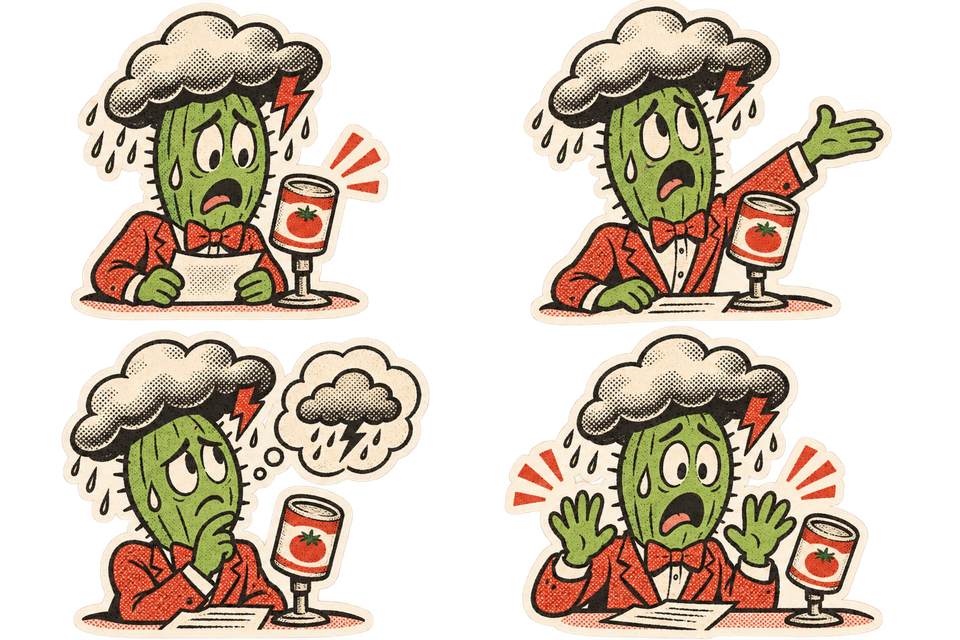
Weather presenter cactus stickers
Four die-cut stickers of the same anxious cactus weather presenter in different poses. Keep the soup-can microphone and storm-cloud hat consistent. Use retro comic linework and red-green halftones. Leave clear gaps. Transparent background.
Frequently asked questions
Can I start from a reference?
Yes. Select image editing and upload an image you have the right to use.
How do I check the output?
Inspect at chat size, then check the full-size edges. Leave a margin for printing and confirm the printer’s bleed, resolution and color requirements.
How much does one image cost?
The generator shows the total before submission. Standard generation starts at 12 credits, and a standard edit with one reference starts at 14.
How can I refine a result?
Open a previous result and choose Edit this result. Specify the change and what to keep.
Which file should I keep?
Keep your original reference and the accepted export. Keep a separate editable copy of text that must be exact.