
Portrait editing with Seedream 5.5
Upload a photo you have permission to edit. A clear adult portrait with an unobstructed face gives you a better reference for pose and identity.
Continue in the workspaceProduction preview
Checking model availability…Start with an idea
Choose a transformation. Its prompt and sample reference are ready to try.
Click to load the prompt and sample reference. You can replace the image with your own.
How to use it
- Upload a photo you have permission to edit. A clear adult portrait with an unobstructed face gives you a better reference for pose and identity.
- Describe one change at a time, for example the lighting, a jacket or the backdrop. Name features you want to retain, including face shape, hairstyle and expression.
- Compare proportions, eyes, skin texture and edges against the reference. Avoid using the workflow to impersonate another person.
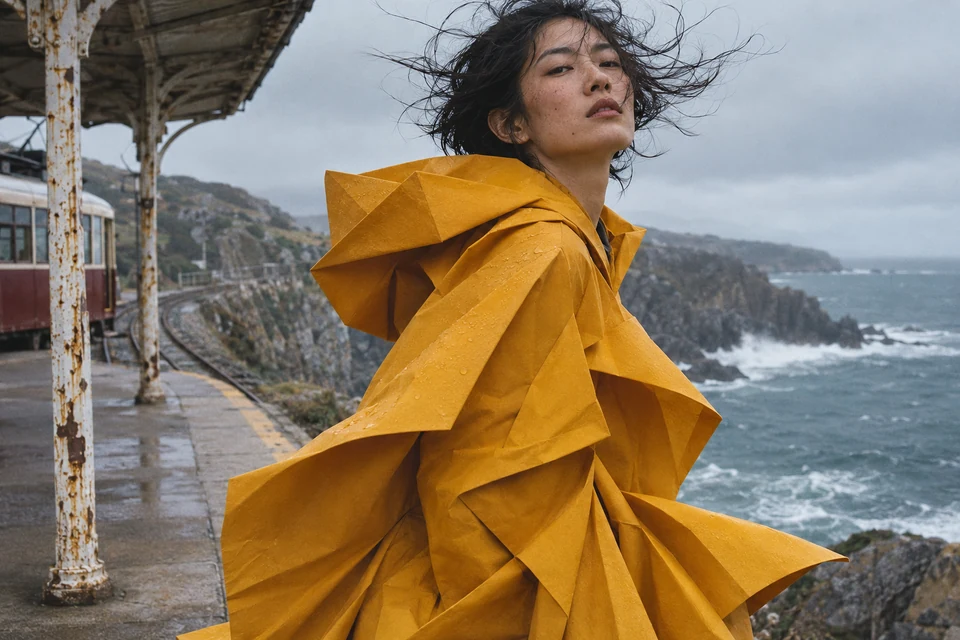
Creative example
Editorial illustration created with OpenAI ImageGen. Use the example to inspect edges and reproduce the workflow.
Coastal tram-stop portrait
Change: recolor the saffron origami raincoat to moss green. Keep: the face, windblown hair, folded silhouette and gray-blue ocean at the coastal tram stop.
Frequently asked questions
Can I start from a reference?
Yes. Select image editing and upload an image you have the right to use.
How do I check the output?
Compare proportions, eyes, skin texture and edges against the reference. Avoid using the workflow to impersonate another person.
How much does one image cost?
The generator shows the total before submission. Standard generation starts at 12 credits, and a standard edit with one reference starts at 14.
How can I refine a result?
Open a previous result and choose Edit this result. Specify the change and what to keep.
Which file should I keep?
Keep your original reference and the accepted export. Keep a separate editable copy of text that must be exact.