
Ecommerce main images with Seedream 5.5
Start with a product reference and a square brief. Keep the complete item inside the frame, with room around the silhouette.
Continue in the workspaceProduction preview
Checking model availability…Start with an idea
Choose a transformation. Its prompt and sample reference are ready to try.
Click to load the prompt and sample reference. You can replace the image with your own.
How to use it
- Start with a product reference and a square brief. Keep the complete item inside the frame, with room around the silhouette.
- Prepare a neutral main image, a second lifestyle frame, and an optional feature detail. Keep product color and construction consistent across them.
- Check the destination marketplace’s current rules on backgrounds, margins, text and size. Inspect the final image against the product before upload.
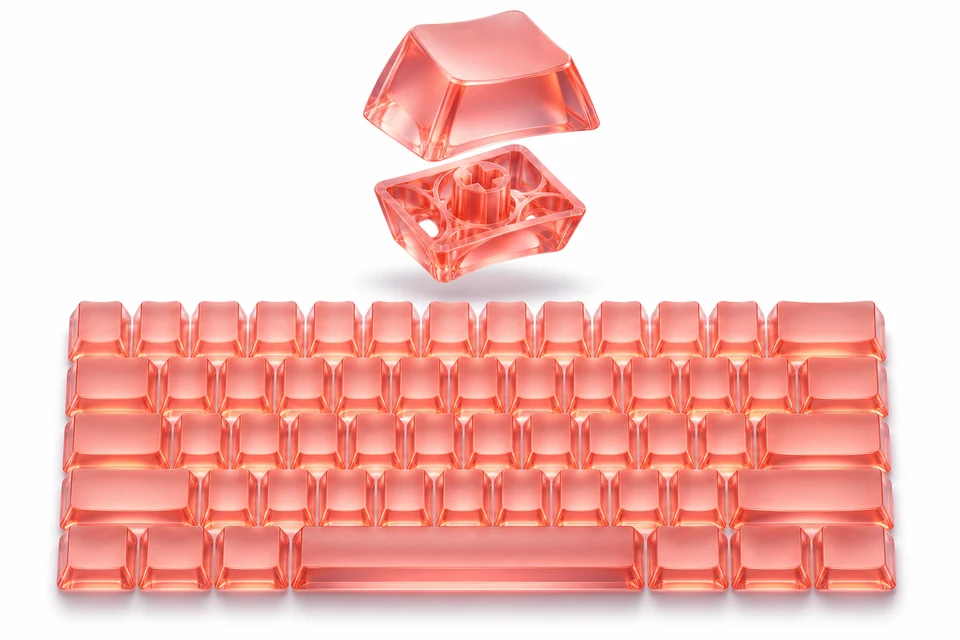
Creative example
Editorial illustration created with OpenAI ImageGen. Use the example to inspect edges and reproduce the workflow.
White-background keycap set
A translucent coral keyboard keycap set on a clean white background. Float one split keycap above the set to reveal the internal lattice, retain the full product silhouette, and use a soft contact shadow.
Main-image delivery
Start with a 1:1 canvas and an original reference. Keep the complete product in frame with about 10% clearance, use a clean background, and add no text or props to the main file.
Before exporting, compare SKU color, label, quantity and included accessories against the original. Export a square main image and keep lifestyle or explanatory images as separate gallery assets. Verify the final dimensions and rules for the target marketplace.
Frequently asked questions
Can I start from a reference?
Yes. Select image editing and upload an image you have the right to use.
How do I check the output?
Check the destination marketplace’s current rules on backgrounds, margins, text and size. Inspect the final image against the product before upload.
How much does one image cost?
The generator shows the total before submission. Standard generation starts at 12 credits, and a standard edit with one reference starts at 14.
How can I refine a result?
Open a previous result and choose Edit this result. Specify the change and what to keep.
Which file should I keep?
Keep your original reference and the accepted export. Keep a separate editable copy of text that must be exact.