
Transparent PNGs with Seedream 5.5
Start with one clearly separated subject, such as a product cutout, sticker or wordmark. Decide where you will place it before choosing the crop and size.
Continue in the workspaceProduction preview
Checking model availability…Start with an idea
Choose a transformation. Its prompt and sample reference are ready to try.
Click to load the prompt and sample reference. You can replace the image with your own.
How to use it
- Start with one clearly separated subject, such as a product cutout, sticker or wordmark. Decide where you will place it before choosing the crop and size.
- Ask for a transparent background and describe details you want to preserve, such as the rim of a glass bottle, gaps between feathers or a light fabric edge.
- Check the PNG over both light and dark colors. Make sure the background has transparent pixels and inspect for halos. If it comes back opaque, revise the request or use the background remover.
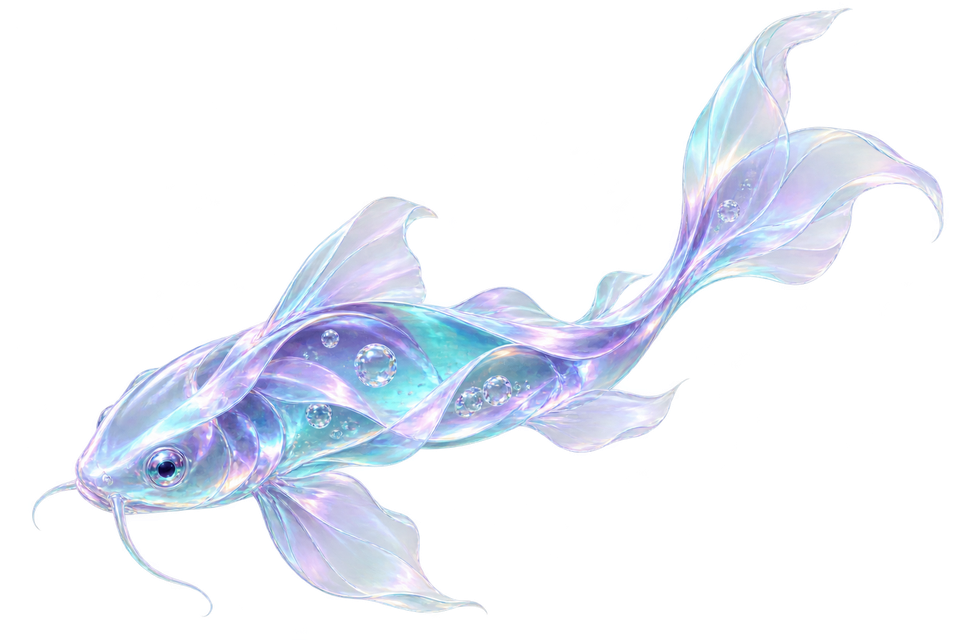
Creative example
Editorial illustration created with OpenAI ImageGen. Use the example to inspect edges and reproduce the workflow.
Translucent glass koi
An isolated liquid-glass koi made of folded aqua and violet optical ribbons. Keep the fin edges translucent, show the tiny bubbles inside the glass, and leave room around the full silhouette. Transparent background.
Frequently asked questions
Can I start from a reference?
Yes. Select image editing and upload an image you have the right to use.
How do I check the output?
Check the PNG over both light and dark colors. Make sure the background has transparent pixels and inspect for halos. If it comes back opaque, revise the request or use the background remover.
How much does one image cost?
The generator shows the total before submission. Standard generation starts at 12 credits, and a standard edit with one reference starts at 14.
How can I refine a result?
Open a previous result and choose Edit this result. Specify the change and what to keep.
Which file should I keep?
Keep your original reference and the accepted export. Keep a separate editable copy of text that must be exact.