
Change and Keep editing prompts
Start from a result or a reference you can reuse. Give the first revision a single goal, such as changing the optical glass color or softening the shadows.
Continue in the workspace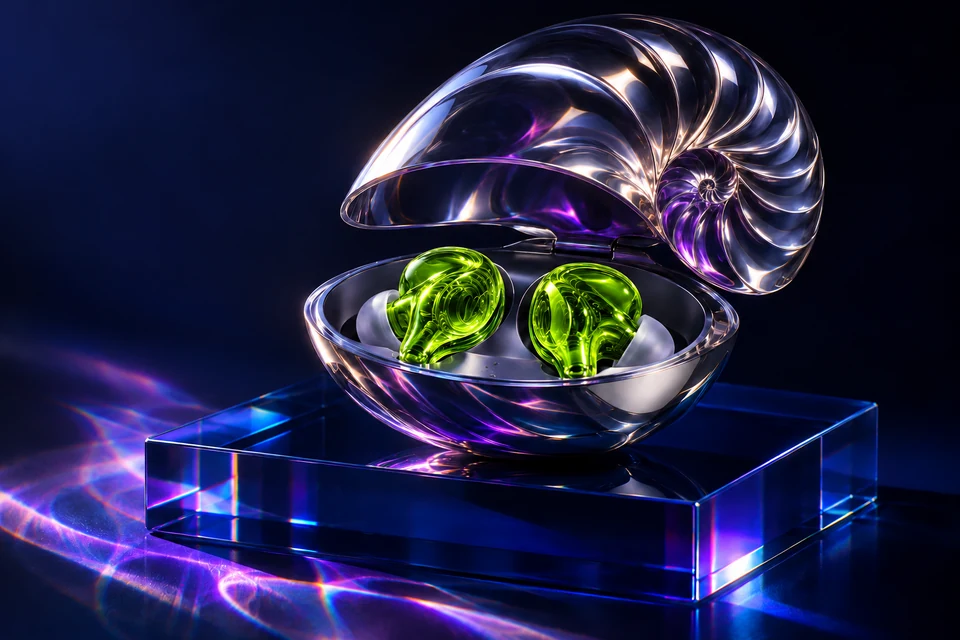
Creative example
Editorial illustration created with OpenAI ImageGen. Use the example to inspect edges and reproduce the workflow.
Optical glass color edit
Change: turn only the ultraviolet earbud shells into acid-green glass. Keep: the chrome nautilus case, blue plinth, positions, camera angle and lighting outside the earbuds.
Change: Change only the earbud shells to acid-green glass. Keep: the nautilus case and earbuds recognizable, with the original camera angle, framing and all other details.
Use this promptChange: Change the plinth to brushed aluminum. Keep: the nautilus case and earbuds recognizable, with the original camera angle, framing and all other details.
Use this promptChange: Soften only the cast shadow on the table. Keep: the nautilus case and earbuds recognizable, with the original camera angle, framing and all other details.
Use this promptChange: Move the key light slightly to the left. Keep: the nautilus case and earbuds recognizable, with the original camera angle, framing and all other details.
Use this promptChange: Make the case lid satin instead of mirrored. Keep: the nautilus case and earbuds recognizable, with the original camera angle, framing and all other details.
Use this promptChange: Replace the background with pale cool gray. Keep: the nautilus case and earbuds recognizable, with the original camera angle, framing and all other details.
Use this promptChange: Change the right earbud only to translucent amber. Keep: the nautilus case and earbuds recognizable, with the original camera angle, framing and all other details.
Use this promptChange: Bring back the original violet tone. Keep: the nautilus case and earbuds recognizable, with the original camera angle, framing and all other details.
Use this promptChange: Remove the blue reflection from the plinth edge. Keep: the nautilus case and earbuds recognizable, with the original camera angle, framing and all other details.
Use this promptChange: Make the optical plinth half as tall. Keep: the nautilus case and earbuds recognizable, with the original camera angle, framing and all other details.
Use this promptChange: Add faint condensation to the plinth surface. Keep: the nautilus case and earbuds recognizable, with the original camera angle, framing and all other details.
Use this promptChange: Reduce the highlight on the top of the chrome case. Keep: the nautilus case and earbuds recognizable, with the original camera angle, framing and all other details.
Use this promptChange: Change the background to warm linen. Keep: the nautilus case and earbuds recognizable, with the original camera angle, framing and all other details.
Use this promptChange: Add a subtle teal rim light. Keep: the nautilus case and earbuds recognizable, with the original camera angle, framing and all other details.
Use this promptChange: Make the two earbud shells matte ivory. Keep: the nautilus case and earbuds recognizable, with the original camera angle, framing and all other details.
Use this prompt