
Seedream Photo to 3D Figurine: A Reference Editing Brief
Turn an adult portrait into a collectible character concept with a clear identity reference, material brief and full-body framing checklist.
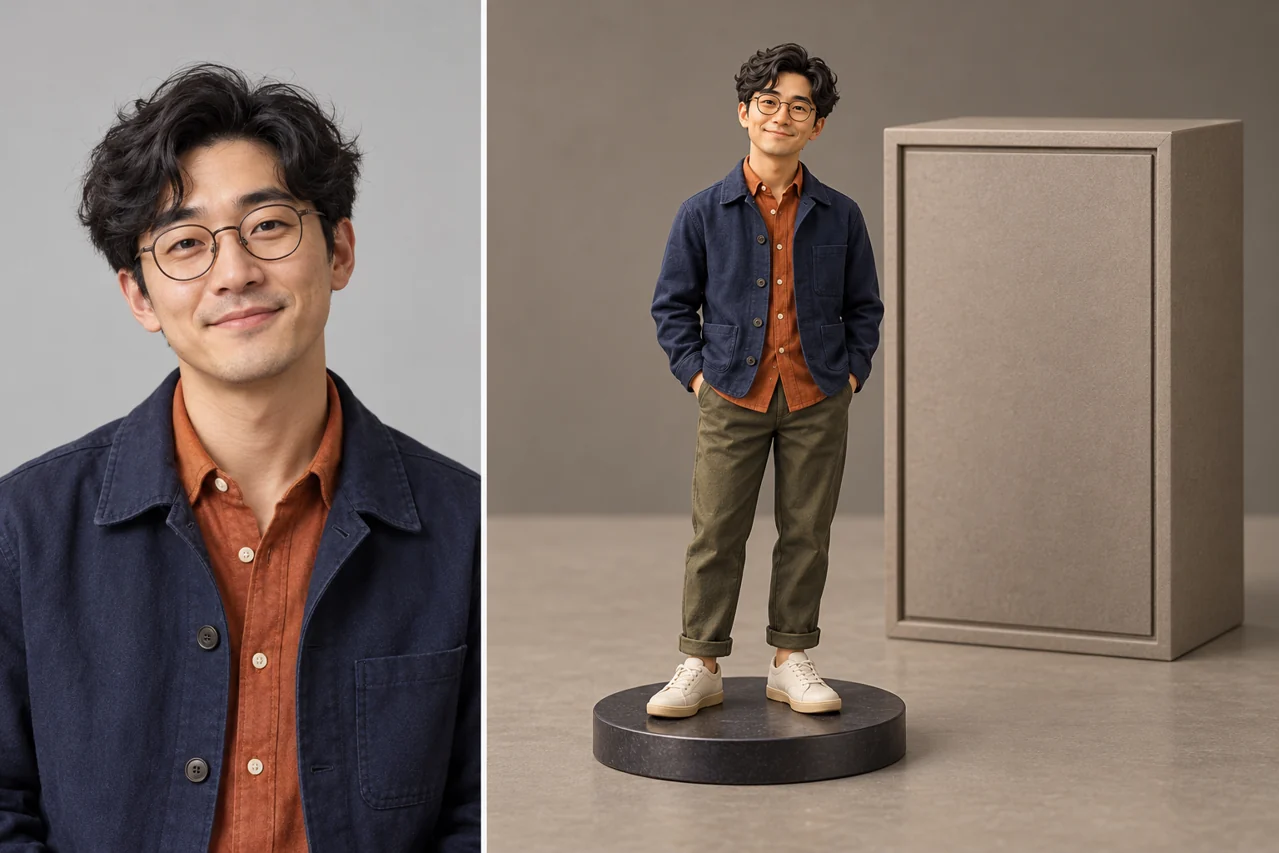
For a photo-to-figurine task, use a clear adult portrait as an identity reference and describe the collectible as a separate target design. The goal is a rendered character concept that preserves recognizable features. A generated image is not automatically a printable 3D model, mesh or manufacturing file.
Choose a useful identity reference
A front or three-quarter portrait with even light is easier to describe than a heavily filtered image. Keep glasses, hairstyle and distinctive accessories visible. Use a photo with permission. If the desired outfit is not shown, describe it explicitly instead of asking the model to reconstruct unseen details. Avoid several conflicting identity references in the first attempt.
Decide what kind of collectible you want
Name the physical style: painted vinyl, matte ceramic, clear resin or a realistic miniature. Specify full-body versus bust, pose, base and camera view. These decisions communicate more than a long list of quality adjectives. Leave room above the head and below the feet if the final image must show the entire object.
Separate identity from material
Write a preservation list for face shape, hairstyle and glasses. Then describe the changes: a miniature body, simplified sculpted surfaces, a display base and studio light. Do not ask for photoreal skin and opaque painted plastic in the same surface. For transparent resin, name which parts remain clear and which retain color.
An adaptable prompt
Use the uploaded adult portrait as the identity reference. Create a full-body collectible figurine with recognizable face shape, hairstyle and glasses. Teal jacket, simple neutral pose, sculpted resin surfaces, round silver display base, clean studio light. Keep the entire head, hands and feet inside frame. No lettering, packaging or brand logos.
Inspect it as an object
Check the feet, hands, glasses, contact with the base and the direction of shadows. Ask whether material highlights continue logically around the form. Compare the face with the reference at the same viewing size. If the figure is cropped, revise the framing before adding accessories. This keeps the next task focused.
Keep the final use realistic
Save the accepted image as a concept reference. If you need manufacturing, commissioning or 3D printing, that requires a separate modeling workflow and technical checks. An attractive render does not establish watertight geometry, scale or production tolerances. For a profile picture, test the crop at the actual small display size.
Put the brief to work
Choose one observable goal, submit a controlled request and save an accepted baseline before revising.
Frequently asked questions
Will the output be a 3D printing file?
No. This workflow creates an image concept. A mesh or printable file requires a separate production process.
How do I preserve the face?
Use a clear reference, list the important identity features and compare the result directly. No prompt guarantees an exact match.
What should I fix first?
Resolve identity and complete framing before adding props, packaging or a complicated background.
Related guides and sources
- Seedream Image Creation and Editing: A Practical First Workflow
- Seedream Model Guide: 5.5, 5.0 Pro, 5.0 Lite and 4.5
- Seedream Fashion Portrait Prompts: Outfit, Light and Identity
- Seedream Bilingual Poster Guide: Exact Text and Clear Hierarchy
- Seedream Credits and Plans: Budget for Tasks, Not Promised Images
- Pricing
- Refund policy
- Open the generator